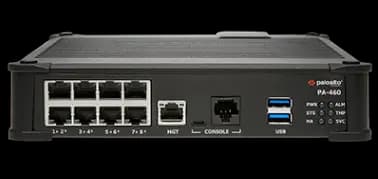
Indian enterprises with multiple branch offices face a consistent challenge: how to deliver consistent security across every location without placing a certified security engineer at each site. Palo Alto Networks PA-400 Series firewalls — managed centrally by Panorama — solve this problem. This guide covers how Indian organisations use the PA-400 Series for branch office security and why it outperforms the legacy router-plus-UTM approach.
The Branch Office Security Problem in India
Most Indian companies with branch offices use one of these approaches:
Router with basic firewall rules: A Cisco, Juniper, or ISP-provided router with simple ACLs. No application visibility, no IPS, no sandboxing. Adequate for internet access in 2010 — inadequate for 2026 when all threats travel over HTTPS.
UTM appliance (Sophos, SonicWall, Fortinet): Better than a basic router — includes IPS and antivirus. But UTM operates on port/protocol rules; it cannot identify applications inside HTTPS traffic.
VPN back to HQ: Branch office traffic hairpins back through the head office firewall. Creates latency, consumes HQ bandwidth, and creates a single point of failure for all branches.
The Palo Alto PA-400 Series with Panorama replaces all of these approaches — placing a full enterprise NGFW at each branch, managed centrally as if every branch were part of one unified security policy.
How Palo Alto PA-400 Series Solves Branch Office Security
App-ID at the Branch — Not Just at HQ
The most common mistake in branch office security is placing the NGFW only at headquarters and routing branch traffic through it. This creates latency (all cloud application traffic travels to HQ before going to the internet), consumes bandwidth (internet breakout at HQ for branch users), and fails when the HQ link goes down.
With a PA-400 Series at each branch:
- Local internet breakout — Zoom, Microsoft 365, and Google Workspace traffic goes directly to the internet from the branch, not via HQ
- App-ID at each site — every application is identified and controlled locally
- Security policy from Panorama — even though inspection happens locally, the policy is pushed from the central Panorama instance
SD-WAN Built Into Every PA-400 Series
Every PA-400 Series model includes SD-WAN capabilities in PAN-OS at no additional cost:
Dual ISP configuration: Connect two ISP links to the PA-400 Series. When the primary link fails, the secondary activates automatically — typical failover in under a second.
Application-aware path selection: Critical business applications (ERP, video conferencing) are routed over the best-performing link. Non-critical traffic (software updates, backup) uses the secondary link, preserving primary bandwidth.
SLA-based routing: Define SLA thresholds for latency, jitter, and packet loss. If the primary link degrades below threshold, traffic automatically moves to the secondary before users notice.
This SD-WAN capability replaces dedicated SD-WAN appliances that some Indian companies add as a separate layer — the PA-400 Series does both functions in one appliance.
Branch Office Architecture — PA-440 + Panorama
Typical architecture for an Indian company with 5 branch offices:
Head Office (Mumbai)
└── PA-3220 (perimeter NGFW)
└── Panorama (manages all 6 firewalls)
└── GlobalProtect Gateway (for remote users)

Branch: Delhi
└── PA-440 (managed by Panorama)
└── Dual ISP (SD-WAN failover)

Branch: Bangalore
└── PA-440 (managed by Panorama)

Branch: Chennai
└── PA-440 (managed by Panorama)

Branch: Pune
└── PA-440 (managed by Panorama)

Branch: Hyderabad
└── PA-440 (managed by Panorama)
What Panorama does in this architecture:
- Maintains the security policy for all 6 firewalls centrally
- Pushes policy changes to all branches simultaneously
- Aggregates logs from all 6 firewalls into one searchable view
- Applies firmware updates across the entire fleet
- Generates compliance reports across all sites
What this means for IT operations: A team of 3 security engineers at the Mumbai head office can manage security for the entire company — including all 5 branch offices — from Panorama. No security expertise is required at the branch level.
GlobalProtect VPN — Remote Workers Connect Through the Nearest Branch
For companies with remote workers in cities where they have a branch office, GlobalProtect can be configured to connect remote users to the nearest branch PA-440 rather than all the way back to HQ.
Benefits of this architecture:
- Lower VPN latency for remote users (connecting to a local branch is faster than HQ)
- HQ bandwidth is not consumed by remote user VPN traffic
- Remote users get full NGFW policy enforcement from the nearest branch firewall
- Consistent security posture whether in the office, remote, or traveling
Use Case — Indian Retail Chain (50 Stores)
The challenge: A retail chain with 50 stores across India. Each store has 5–10 POS terminals, a manager's laptop, and a CCTV system. Corporate policy requires internet access for POS cloud connectivity and restricts streaming and social media during business hours.
Previous setup: ISP-provided router with basic NAT. No security, no application control, no visibility.
PA-400 Series deployment:
- PA-410 at each of the 50 stores (sized for 10–15 users per store)
- Panorama at HQ managing all 50 firewalls
- Security policy: allow POS applications (App-ID identifies specific payment gateway apps), block social media and streaming, block USB storage via GlobalProtect endpoint policy
- SD-WAN: primary fibre ISP, secondary broadband for failover — POS terminals always connected
Operational result: The IT team at HQ manages security for all 50 stores from Panorama. When a new store opens, a PA-410 is shipped to the site, the store manager cables it up, it connects to Panorama, and the full security policy is applied automatically within minutes.
Use Case — IT/ITES Company (4 Offices)
The challenge: An IT services company with 1,500 employees across Mumbai (800), Bangalore (400), Hyderabad (200), and Pune (100). Employees access Microsoft 365, internal development tools, and video conferencing (Teams, Zoom). Client contracts require documented network security and quarterly firewall policy reviews.
PA-400 Series deployment:
- PA-460 at Mumbai (800 users, high session count)
- PA-450 at Bangalore (400 users)
- PA-440 at Hyderabad and Pune (200 and 100 users)
- PA-3220 at the co-location data centre (where internal servers are hosted)
- Panorama at Mumbai managing all 5 firewalls
- WildFire, Threat Prevention, URL Filtering active at all sites
Compliance deliverable: Quarterly policy reviews are exported from Panorama as reports — showing all security rules, allowed applications, blocked threat categories, and WildFire findings. Provided to clients as evidence of security controls.
Buying PA-400 Series for Branch Office Deployment in India
For a multi-site Indian deployment, we recommend engaging an authorised Palo Alto partner for:
- Site-by-site sizing — different sites have different user counts and throughput requirements
- Panorama sizing — the Panorama appliance must handle log volume from all firewalls
- HA decision — which sites need HA pairs vs. single unit
- Subscription bundle — all sites use the same subscription bundle, purchased in bulk
- Phased rollout plan — deploy HQ first, then roll out to branches sequentially
- Deployment templates — Panorama templates allow consistent, repeatable branch deployment
Cloudfy Systems is an authorised Palo Alto Networks partner in India. We design, size, and deploy PA-400 Series branch office security for Indian multi-site organisations — from 2-site companies to national retail networks. Contact us for a multi-site proposal with INR pricing.